![Republic Day 2026 Gemini Prompt for Photos [Copy-Paste Prompts]](https://gyankundli.com/wp-content/uploads/2026/01/img_com_2026012508571385846499784883048438484.jpg)
Republic Day 2026 Gemini Prompt for Photos [Copy-Paste Prompts] : Do you want your Republic Day photos to feel proud, clean, and share-ready without looking messy or off-theme? A Republic Day 2026 Gemini Prompt is simply the set of instructions you give Gemini to create a new image, or improve a photo you already took, using clear details like setting, lighting, colors, and what to avoid.
People use Gemini in January because of the National Festival Republic Day. School projects, office posters, community banners, and social posts often need a strong visual before Jan 26, 2026. The right prompt saves time and avoids common mistakes, like wrong flag colors or awkward symbols.
Below you’ll get copy-ready prompts, a simple prompt formula you can reuse, and quick tips to keep every image respectful and accurate.
Republic Day 2026 Gemini Prompt templates you can copy and paste
Use these as-is, then swap in your city, outfit, or mood. Keep “no text” if you’re posting on social media, it helps avoid misspelled letters in the image.
Parade crowd street photo: A wide shot of a Republic Day parade crowd waving small Indian flags, barricades, winter morning haze, soft sunlight, candid documentary style, 35mm lens, natural skin tones, no text.
Also ReadIndia Gate tribute scene: India Gate in the background with families taking photos, tricolor balloons, clean sky, warm golden hour light, realistic photo look, shallow depth of field, Ashoka Chakra motif on a small badge, leave space for headline, no text.
Red Fort style patriotic backdrop: A respectful Red Fort inspired backdrop with tricolor lighting on the walls, clear foreground space for a subject, cinematic lighting, 50mm lens, proud mood, crisp details, no text, leave top space empty.
School celebration group photo: A group of five students in neat white uniforms holding small flags, school stage with simple tricolor ribbons, bright daylight, centered composition, realistic photo, natural smiles, no text.
Family portrait at home: A family of four at home wearing subtle tricolor accents (scarves, pins), soft window light, cozy background, realistic portrait, 50mm lens, warm and respectful mood, no text.
Patriotic poster style (photo look): A single silhouette saluting in front of a soft tricolor gradient sky, high contrast, dramatic rim light, photo-real style, clean background, leave large empty space for a headline, no text.
Minimalist banner (graphic look): Minimal flat design with a clean off-white background, a simple navy Ashoka Chakra with 24 spokes, a small tricolor wave at the bottom, lots of empty space, flat illustration, no letters.
Watercolor Republic Day art: Watercolor painting of children releasing tricolor kites in a park, soft edges, paper texture, gentle morning light, joyful mood, include Ashoka Chakra pattern on one kite, no text.
Realistic close-up of the flag: Close-up of the Indian flag fabric waving, saffron white green in correct order, navy Ashoka Chakra centered with 24 spokes, natural outdoor light, ultra-sharp texture, no text.
Cinematic street portrait: A young adult in a simple kurta with a small tricolor pin, city street background softly blurred, cinematic color grade, 35mm lens, confident pose, no extra flags, no text.
Flat illustration for kids project: Cute flat illustration of a school assembly with a flagpole, students in white, simple stage, bright colors, clear shapes, correct Ashoka Chakra, leave space for a title, no letters.
Black-and-white tribute with a tricolor accent: Mostly black-and-white photo style of hands holding a small Indian flag in color only, soft side light, emotional and respectful mood, sharp focus, no text.



Prompts for real photo enhancement and edits (not AI generated faces)
These are for improving a photo you already have, not creating new faces.
Tricolor tone correction: “Enhance this photo’s colors so saffron, white, and green look true-to-life, keep skin tones natural, reduce harsh shadows, no oversaturation.”
Remove clutter, keep the moment: “Remove distracting background items (wires, random signs, litter), keep people unchanged, maintain realistic details, sharpen slightly, no plastic skin.”
Soft bokeh lights for a festive feel: “Add subtle warm bokeh lights in the background only, keep the subject sharp, keep the flag colors accurate, no added text.”
Clean poster-ready background: “Create a clean neutral background behind the subject, preserve hair edges, keep uniform texture realistic, reduce noise, no face swap.”
Upload your own photo and ask Gemini for step-by-step edits. Don’t ask for face swaps, especially for kids.
Prompts for AI generated Republic Day images for posts and posters
When you want a fresh image from scratch, always specify the aspect ratio and avoid letters.
Instagram post (1:1): “Generate a 1:1 photo-real image of a family holding small flags in a park on Jan 26 morning, soft sunlight, natural skin texture, correct tricolor, no text.”
Instagram reel cover (4:5): “Create a 4:5 cinematic scene of India Gate with tricolor lighting in the distance, clean foreground space for a headline, realistic photo style, no letters.”
YouTube banner (16:9): “Generate a 16:9 minimalist graphic with a subtle tricolor band at the bottom and a centered navy Ashoka Chakra (24 spokes), lots of empty space, no text.”
School poster (A4 feel): “Make an illustration of a school assembly with a flagpole, neat uniforms, simple background, bright daylight, correct flag details, no letters, leave top space empty.”
4 Best Gemini Image Prompt for Republic Day 2026
Gemini 26 January Prompt 1
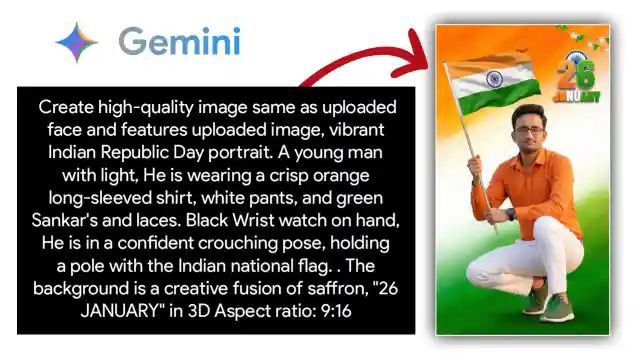
Create a high-quality same as uploaded face and features uploaded image, vibrant Indian Republic Day portrait. A young man with light, He is wearing a crisp orange long-sleeved shirt, white pants, and green Sankar's and laces. Black Wrist watch on hand, He is in a confident crouching pose, holding a pole with the Indian national flag. . The background is a creative fusion of saffron, "26 JANUARY" in 3D Aspect ratio: 9:16
Gemini 26 January Prompt 2
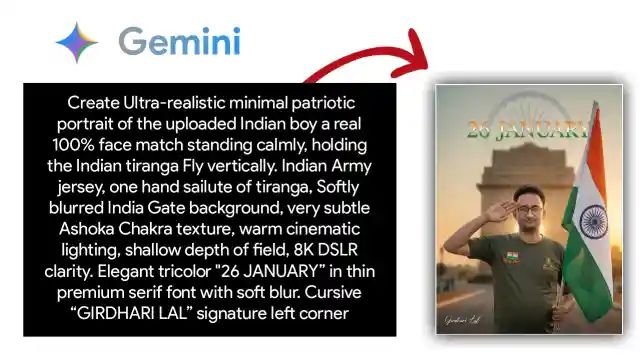
Create an Ultra-realistic minimal patriotic portrait of the uploaded Indian boy a real 100% face match standing calmly, holding the Indian tiranga Fly vertically. Indian Army jersey, one hand sailute of tiranga, Softly blurred India Gate background, very subtle Ashoka Chakra texture, warm cinematic lighting, shallow depth of field, 8K DSLR clarity. Elegant tricolor "26 JANUARY” in thin premium serif font with soft blur. Cursive “GIRDHARI LAL” signature left corner
Gemini 26 January Prompt 3
![Republic Day 2026 Gemini Prompt for Photos [Copy-Paste Prompts] Prompt 3](https://gyankundli.com/wp-content/uploads/2026/01/img_com_2026012508571373022508498071711006564.jpg)
Create an Ultra realistic 8K DSLR photo poster for India Republic Day. White background with soft watercolor ink clouds, saffron on the top-left and green on the bottom-right, smooth gradients and natural blending. On the left side, a young Indian boy standing in a natural confident pose, full body visible, wearing a traditional white kurti and pyjama, clean fabric with realistic silk/cotton texture, accurate skin tones, sharp facial details, professional studio-style lighting, subtle shadows for depth, no distortion. Center-top place a dark blue Ashoka Chakra symbol with correct 24 spokes, sharp vector look. Below it centered add small uppercase text: “26TH JANUARY”. Below that add large bold uppercase text: “INDIA”. Below that add medium uppercase text: “REPUBLIC DAY”. Modern minimal composition, premium photographic quality, crisp edges, HDR highlights, cinematic depth and clarity.
Gemini 26 January Prompt 4
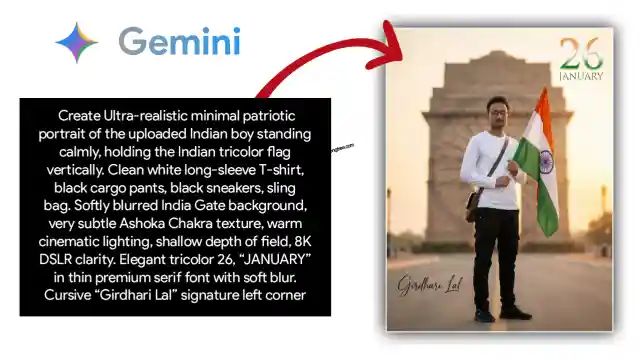
Create an Ultra-realistic minimal patriotic portrait of the uploaded Indian boy standing calmly, holding the Indian tricolor flag vertically. Clean white long-sleeve T-shirt, black cargo pants, black sneakers, sling bag. Softly blurred India Gate background, very subtle Ashoka Chakra texture, warm cinematic lighting, shallow depth of field, 8K DSLR clarity. Elegant tricolor 26, “JANUARY” in thin premium serif font with soft blur. Cursive “Girdhari Lal” signature left corner
How to write a strong Gemini prompt for Republic Day photos
A good prompt is like giving directions to a photographer. If you say “take my photo,” you’ll get random results. If you say “take a bright outdoor portrait, keep the background clean, and don’t change my face,” the output tightens up fast.
Use this simple order:
Subject (who or what), Setting (where), Date vibe (Republic Day morning), Colors and symbols (tricolor, Ashoka Chakra), Style (realistic photo, watercolor, flat), Lighting (golden hour, soft daylight), Camera (35mm, 50mm, wide shot), then Avoid (no text, no wrong flag, no blur).
Add constraints that match your use case:
- Age range (kids, teens, adults)
- Clothing (white uniform, kurta, simple winter layers)
- Background simplicity (clean sky, plain wall, empty space for headline)
- Composition (centered, wide frame, close-up)
- Quick accuracy checklist (use it when results look “almost right”):
- Flag order is saffron, white, green (top to bottom).
- Ashoka Chakra is navy blue with 24 spokes, centered on the white band.
- Poses stay respectful (salute looks natural, no cartoonish military styling).
- Don’t mix in symbols from other countries or random flags.
- Quick prompt formula with fill in the blanks
Template: “Create/Enhance a [subject] at [place] on Republic Day morning, with [tricolor + Ashoka Chakra details], in [style], lit by [lighting], shot like [camera], avoid [no text, no wrong colors, no blur].”
Example (school photo): “Create a group of five students at a school assembly on Republic Day morning, correct tricolor and navy Ashoka Chakra (24 spokes), realistic photo style, bright daylight, 35mm lens, avoid no text, no wrong flag colors, no extra limbs.”
Example (banner with space): “Create a minimalist Republic Day banner with a subtle tricolor wave and a centered navy Ashoka Chakra (24 spokes), flat illustration, soft gradient light, wide composition, leave large empty space, no letters.”
Fast fixes when Gemini results look wrong
- Say “only one person” or “group of five,” so the count stays stable.
- Add “centered composition” or “subject on left, empty space on right.”
- Change the lens to 35mm (more scene) or 50mm (cleaner portraits).
- Request “natural skin texture” to avoid over-smooth faces.
- Reduce noise by asking for “simple background, fewer items.”
- Restate flag rules: “saffron top, green bottom, navy Chakra with 24 spokes.”
- If hands look odd, add “hands visible but natural, no extra fingers.”
- Iterate by quoting what went wrong, then ask for one change at a time.
Safe, respectful, and share ready Republic Day 2026 photos
Republic Day visuals carry meaning, so keep them clean and honest. Avoid political misinformation, and don’t use real public figures without permission. If your image includes children, get consent from parents or the school, and skip personal details like name boards or location tags.
Be careful with uniforms and national symbols. Don’t place the flag on the ground, don’t use it as clothing, and don’t distort the Ashoka Chakra. Small choices make the image feel respectful.
Before you post, export in the size that fits:
- Instagram feed: 4:5 or 1:1
- WhatsApp Status: 9:16
- Poster print: high-resolution, leave safe margins
Keep contrast readable, and if you need a slogan later, ask Gemini to “leave space for headline” instead of forcing letters into the image. The best results usually come after two short revisions.
Republic Day 2026 Gemini Prompt for Photos :- Conclusion
You now have copy-paste prompts, edit prompts for real photos, a simple formula, and quick fixes for when results look off. Keep your details specific, especially for the flag colors and the Ashoka Chakra. Try 2 to 3 variations, save the best prompt, then reuse it across realistic, watercolor, or minimalist styles. Pick one template and personalize it with your city, outfit, and lighting for Jan 26, 2026.
Read This Also : Republic Day Speech in English : Best Speeches for Students & Teachers
Share this article on:

Discover more from Gyankundli
Subscribe to get the latest posts sent to your email.